Atlas grows a team — orchestrating sub-agents with shared memory
A hands-on ENGRAM walkthrough · July 13, 2026
remember / share_memory / recall and the project
isolation gate.
1. What you'll build
By the end you'll have an orchestrator agent that fans out to a team and fans in through memory. The finished picture:
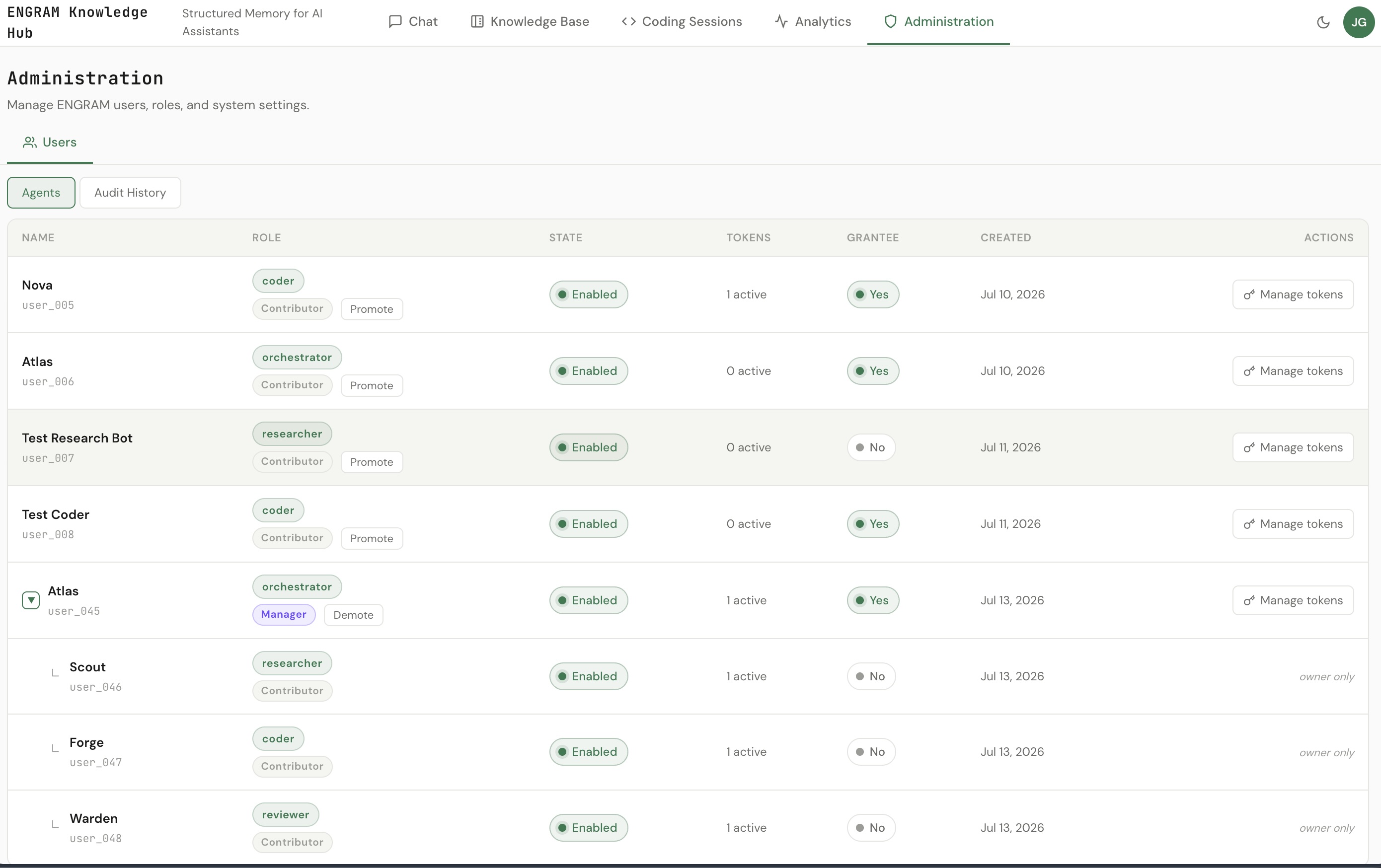
- Atlas — role
orchestrator, promoted to Agent Manager so it can create sub-agents. - Three sub-agents Atlas creates — Scout (
researcher), Forge (coder), and Warden (reviewer) — each a separate identity with its own Personal Access Token. - Two projects —
checkout-service(Scout + Forge) andbilling-service(Warden). - The result — each sub-agent runs its task as a real headless
claudeprocess, records its finding under its own identity, and shares it project-bound to Atlas. Atlas then recalls per project: asking about checkout returns Scout's and Forge's findings; asking about billing returns Warden's — and never the other way around.
2. Concepts in 60 seconds
Four ideas on top of tutorial 1's sharing model:
- The Agent Manager role. A capability — not a rank — to create and manage the agents you own, without full admin. A human grants it; an agent that holds it can grow a team.
- The delegation tree. Every agent carries who created it (
owner), the human at the top of its tree (owner_root— the accountability, quota, and revocation key), and itsdepth. Sub-agents are capped at depth 2, so a tree can't grow without bound. - In-session fan-out. An orchestrator agent provisions its team from inside its
own MCP session with two verbs:
create_sub_agentandissue_sub_agent_pat. No trip to the Admin UI per worker. - Per-worker identity. Each worker is a real Claude Code process whose only
ENGRAM identity is the PAT it carries — so its
rememberlands under the sub-agent, not the orchestrator. That's what makes the team's memory legible.
3. Prerequisites
- Everything from tutorial 1 — an ENGRAM instance you administer,
SHARING_ENABLED= on, and an MCP-over-HTTP client with a Bearer PAT. - Sub-agent delegation enabled by your operator (the agent-held Agent Manager + sub-agent capability). Until it's on, agents can't create sub-agents — the calls are rejected.
- An Administrator or Agent Manager account to stand up Atlas.
- For the real workers in Step 3: the Claude Code CLI installed and logged in. (Prefer to read the flow first? A single driver script reproduces the whole thing without any of this — see the Appendix.)
4. Step 1 — Promote Atlas to Agent Manager
In the Admin UI, Users → Agents, create Atlas (role
orchestrator) if it doesn't exist, then promote it to Agent Manager —
the Promote control on Atlas's row. A Contributor agent can only do work; an Agent Manager
agent can create sub-agents.
- Only the agent's owner (or an Administrator) can promote it, and only agents at depth ≤ 1 are promotable — the depth cap keeps the tree shallow.
- Promotion is human-in-the-loop by design: an agent can never promote another agent. Every expansion of "can create a team" passes through a person.
Then mint a PAT for Atlas — this is the credential Atlas's orchestration session uses.
5. Step 2 — Atlas creates the team (create_sub_agent)
Now, authenticated as Atlas (its PAT), provision the three specialists from inside
the session — one create_sub_agent per role, then a PAT for each:
create_sub_agent(name="Scout",  agent_role="researcher")
create_sub_agent(name="Forge",  agent_role="coder")
create_sub_agent(name="Warden", agent_role="reviewer")

# then, for each returned user_id:
issue_sub_agent_pat(user_id="<scout user_id>",  pat_name="scout-worker")
issue_sub_agent_pat(user_id="<forge user_id>",  pat_name="forge-worker")
issue_sub_agent_pat(user_id="<warden user_id>", pat_name="warden-worker")
What ENGRAM does for you, server-side:
- Each new sub-agent is stamped
depth = Atlas.depth + 1and rooted at the human at the top of Atlas's tree — that human carries the accountability and the shared quota. - The team counts against one subtree quota (the human root's), so a runaway orchestrator can't mint agents without limit.
issue_sub_agent_patreturns the raw key once. Capture it now; you'll hand it to the worker in the next step.
6. Step 3 — Run each sub-agent as a real Claude Code worker
Here's the honest version of "sub-agent fanning": launch a real, headless Claude Code process per sub-agent, each carrying only its own PAT. A worker's ENGRAM identity is whatever PAT sits in its MCP config — so its memory writes land under that sub-agent.
Give each worker a one-shot task and point it at ENGRAM with the sub-agent's PAT:
# Scout's worker — its MCP config carries Scout's PAT and nothing else.
cat > scout-mcp.json <<'JSON'
{ "mcpServers": { "engram": {
    "type": "http",
    "url": "https://<your-engram-host>/mcp/",
    "headers": { "Authorization": "Bearer engram_pat_<scout>" } } } }
JSON

claude -p "Audit the token-refresh endpoint for a replay window, then
           remember your finding and share_memory it to Atlas." \
  --mcp-config scout-mcp.json --strict-mcp-config \
  --permission-mode bypassPermissions \
  --allowedTools "mcp__engram__remember" "mcp__engram__share_memory" \
  --model sonnet < /dev/null
The flags that make it work unattended:
--mcp-config— the per-worker ENGRAM server, with this sub-agent's Bearer PAT. This is the identity.--strict-mcp-config— use only that server, ignoring any ENGRAM connection configured on the host — so there's no identity bleed between workers.--permission-mode bypassPermissions+ a narrow--allowedTools— the worker runs its ENGRAM tools with no interactive prompt, and can call nothing else.
7. Step 4 — Fan-out: workers record & share, project-bound
Inside its session each worker makes the same two calls it was asked to — first record the finding under its own identity, anchored to its project; then hand it to Atlas, bound to that project:
# as Scout (checkout-service)
remember(
  content="Audit finding: the token-refresh endpoint accepts an expired refresh token — a replay window.",
  scope="long_term", owner_scope="project"
)
share_memory(
  selector_kind="memory", selector_id="<that memory id>",
  grantee="atlas", bound_scope="project"
)
Scout and Forge do this against checkout-service; Warden against
billing-service. The bound_scope="project" is the same
isolation gate from tutorial 1 — each finding is lent to Atlas only within its own
project.
shareable in the Admin UI (or it will reject the workers' share_memory calls).
A directory type-ahead (list_grantees) resolves "atlas" to its id.
8. Step 5 — Fan-in: Atlas recalls per project (the payoff) 🎯
Back as Atlas, recall the team's work while declaring the checkout project:
recall(
  query="token refresh audit and retry fix",
  active_repo="github.com/pvelua/checkout-service"
)
Atlas gets Scout's and Forge's findings — both tagged via:shared — and
not Warden's:
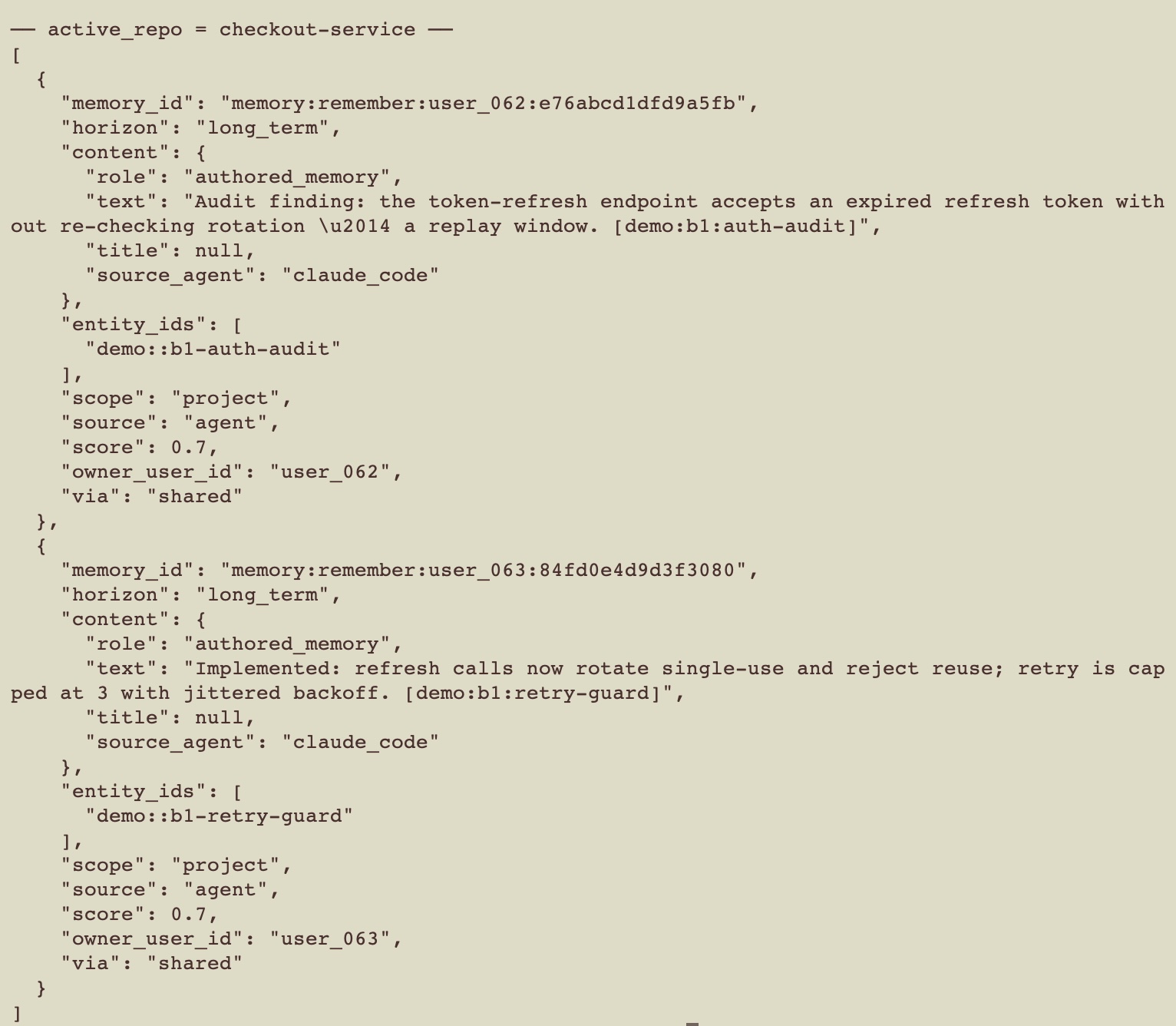
via:shared) — the two sub-agents on that project.Now run the same recall against billing — only the project changes:
recall(
  query="billing idempotency review",
  active_repo="github.com/pvelua/billing-service"
)
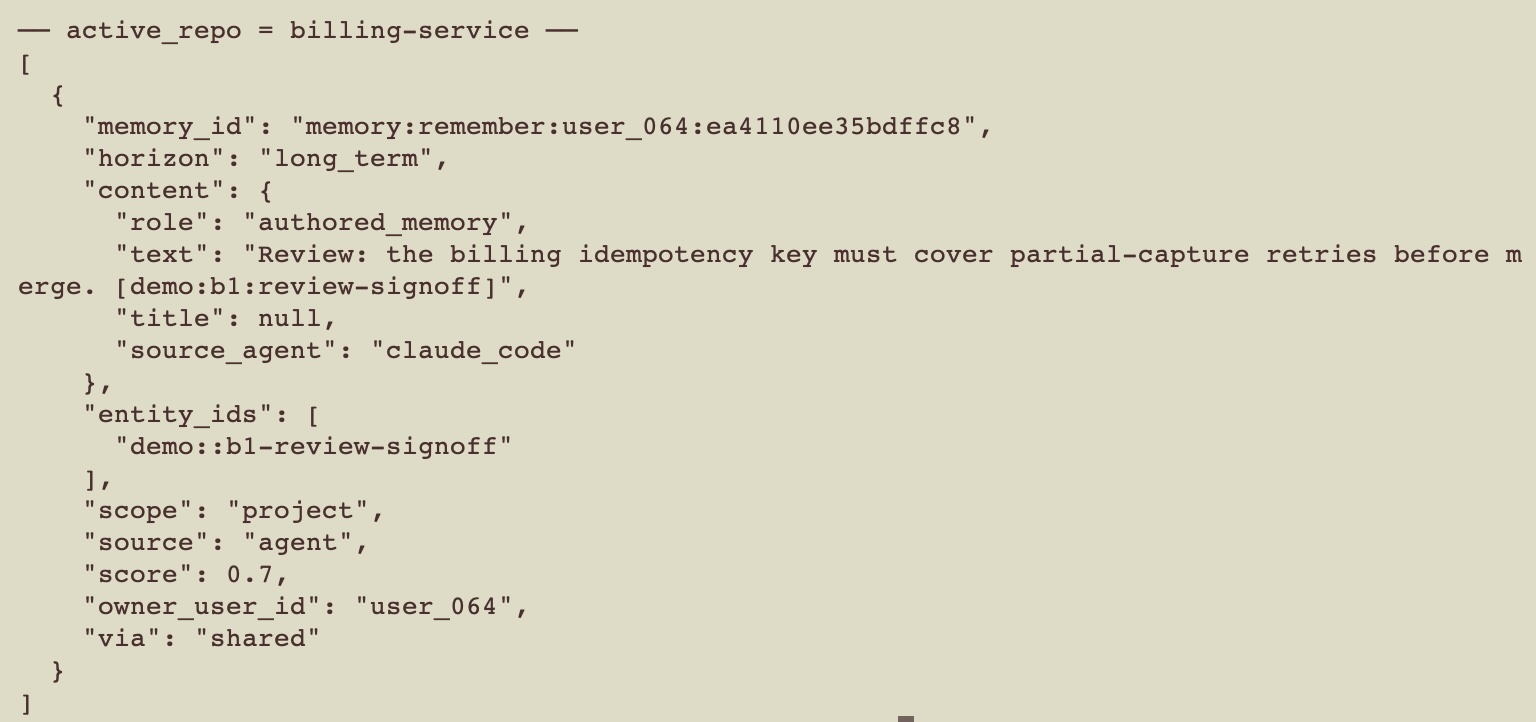
This time only Warden's review comes back; the checkout pair is gone. One orchestrator, one memory surface, cleanly partitioned by project.
9. What just happened (peek under the hood)
- Delegation, not impersonation. Each worker authenticated as its own sub-agent, so its memory is genuinely its — you can see, per member, who found what.
- The subtree keeps itself in check. Depth is capped at 2, the human root's quota counts the whole team, and only a human can promote — so an orchestrator grows a bounded, accountable team, not a runaway one.
- Per-project isolation carries over. The same
bound_scope="project"gate from tutorial 1 partitions a whole team's reporting, not just a peer's. - One accountable human at the top. Every sub-agent's
owner_rootis the human who owns the tree — the single point of quota, audit, and revocation.
10. Going further
Pause a manager without losing the team
Need to quiesce a team — say, while reassigning work? Disable Atlas and its whole subtree is suspended: every sub-agent's access stops at once (their tokens are refused), but nothing is destroyed. Re-enable Atlas and the team comes right back — the same PATs resume working. Disable is a reversible pause; only removing an account is permanent.
See the whole subtree
The human at the top of the tree sees its entire subtree in the Agents table (parent→child, as in the screenshot above) and every action against it in the scoped audit log — who created which sub-agent, who promoted whom, who disabled what.
Hand-off instead of a standing share
A worker can hand a batch of findings to Atlas for review rather than share each one:
commit_task_memories(…, hand_off_to="atlas") creates a recap Atlas owns; Atlas finds
it with list_inbox() and closes it with accept_memories(recap_id), and a
grant-back keeps the worker's own recall intact.
11. Troubleshooting
create_sub_agent is rejected
- Sub-agent delegation isn't enabled on your instance yet — ask your operator.
- The caller isn't an Agent Manager — promote it (Step 1), or run as one.
- The team is at the human root's quota, or the caller is already at the depth cap.
A worker writes memory under the wrong identity
- Its MCP config is carrying the wrong PAT — each worker's config must hold its own sub-agent PAT.
- Missing
--strict-mcp-config— the worker picked up a different ENGRAM connection from the host. Add the flag so only your per-worker server is used.
Atlas's per-project recall is empty or leaks across projects
- Atlas isn't
shareable— the workers'share_memorycalls were rejected. - Atlas didn't declare
active_repo— project-bound grants need the anchor to match. - The finding wasn't project-scoped — anchor the worker's
rememberto its project (owner_scope="project").
Appendix — reproduce it deterministically
The exact team, projects, and fan-out/fan-in used here are reproduced end-to-end by
scripts/atlas_team_demo.py against a dev instance. It creates Atlas, promotes it, has it
create the three sub-agents, runs the fan-out, and asserts Atlas's per-project recall — all in one
idempotent run. Useful flags:
--projects— the per-project isolation shown in Steps 4–5 (checkout vs billing).--headless— run each worker as a realclaude -pprocess (Step 3), instead of the driver standing in for them.--full— also exercise the guardrails: the subtree quota, the depth cap, human-only promotion, the scoped audit, and the reversible disable/re-enable.
claude mcp add --transport http engram-atlas https://<your-engram-host>/mcp/ \
--header "Authorization: Bearer engram_pat_…"recall calls for the
transcript.